Shipping takes place within 3-5 business days. If there is a problem with the shipment of the product, we will notify you via the email address you entered when ordering.
1
/
of
6
WirelessDiagnosticsMadeEasy
2026 OBD2 WiFi Adapter MHD Ethernet Adapter for BMW F-G-I Series | Compatible for BimmerCode,E-SYS,ISTA,Bootmod3, Work with iOS, Android & Windows
2026 OBD2 WiFi Adapter MHD Ethernet Adapter for BMW F-G-I Series | Compatible for BimmerCode,E-SYS,ISTA,Bootmod3, Work with iOS, Android & Windows
Regular price
$125.93 USD
Regular price
$125.93 USD
Sale price
Unit price
/
per
Shipping calculated at checkout.
Couldn't load pickup availability
About This
- ENET WiFi Adapter for BMW – This is a dedicated ENET Ethernet OBD2 adapter for BMW F-series, G-series, I-series, it is used with third-party software.supporting professional functions including vehicle diagnosis, ECU coding, and flashing. IMPORTANT: This product ONLY includes the adapter, NO software included.Please verify vehicle compatibility before purchasing and follow the steps on the product details page precisely; feel free to contact us if you have any questions.
- Wide Compatibility with Devices & Vehicle Models – Perfectly compatible with BMW F/G/I-series models, and works seamlessly with iPhone, Android devices and Windows PC/laptop. Just connect this wireless ENET adapter to your device via WiFi, you can easily turn your mobile phone or computer into a professional-grade diagnostic and tuning tool, meeting DIY and maintenance needs.ATTENTION: this adapter cannot be used on E-Series cars!
- Ultra-Fast WiFi Connection Than Bluetooth Adapters – Adopts advanced ENET Ethernet protocol for stable and high-speed data transmission at approx. 100 Mbps. Far faster than traditional Bluetooth adapters that only support 0.5 Mbps via D-CAN protocol, ensuring smooth and efficient diagnosis, coding and flashing without lag or disconnection.
- Easy Plug & Play Setup – It is compatible with E-SYS,BimmerCode, Bootmod3, ISTA D, MHD, XDelete, THOR-the M Flasher, BimmerGeeks Pro-Tool and more, but NOT compatible with xHP Flashtool.
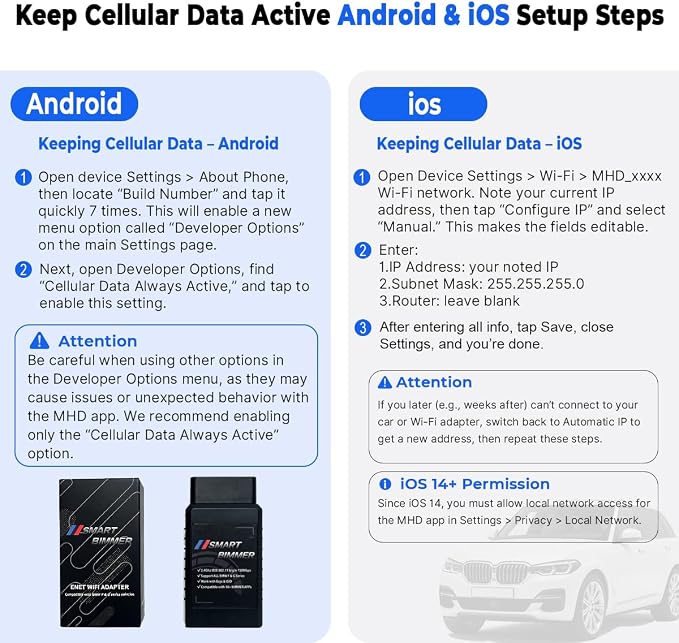
- Reliable After-Sales & iOS Connection Guide – 7/24 online service for solve your proplem anytime. For iOS connection: 1. Connect to ENET WiFi and record the auto-obtained IP address and subnet mask; 2. Manually set the phone’s WiFi IP, fill in the recorded address and subnet mask, enable cellular network (no need to set gateway and DNS). Contact us anytime for installation problems.
Overview
- Brand : SMART BIMMER
- Power Source : ENET WIFI Adapter
- Operating System : Android,iOS,Windows
- Screen Size : 6.5
- Language : English
Share